Concept #
EdgeSqueezer allows precise control over order prices using configurable increments/decrements.
A price offset is defined once and can then be applied repeatedly.
- Define how much the price should move
- Apply the increment in either direction
- Each action repositions the order by that defined step
This enables controlled, step-by-step adjustment of orders as the market moves.
Usage #
Configuration #
- iOS: tap the configuration button
- macOS: configuration panel is always visible
How it works #
Each digit represents a price offset.
You control 5 digits (from right to left).
Example #
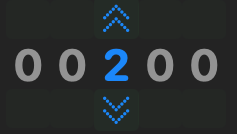
Configuration: 00200
→ shifts price by 200 units of the smallest price step
BTC example #
| Price: | 100000 |
| Config: | 00200 |
| Increase | 100200 |
| Decrease | 99800 |
ETH example #
| Price: | 2135.37 |
| Config: | 002 00 |
| Increase | 2137.37 |
| Decrease | 2133.37 |
XRP example #
| Price: | 1.35394 |
| Config: | 00200 |
| Increase | 1.35594 |
| Decrease | 1.35194 |
Interpretation #
00001→ minimal step00100→ medium adjustment01000+→ aggressive move
You are not limited to single increments.
- Each digit can be 1–9
- Example:
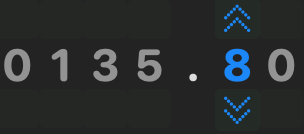
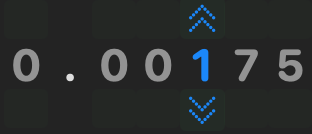
01530→ combined offset across multiple levels
Examples
Key idea #
You define how far away (or close) from current price the order should be placed.
The effect depends on direction:
away from market → more passive (waits for price to come, squeeze edge)
towards market → more aggressive (can execute immediately)
Execution #
iOS #
- Tap and hold for ~1 seconds on the slab
- The slabs border turns orange (ready state)
- Swipe (left or right) to execute the squeeze
A flashing green box confirms successful execution.
Designed to prevent accidental execution.
macOS #
- Command + click on the up/down slab
(or use the Tools menu)
A green flash confirms successful execution.
Designed to prevent accidental execution.
Platinum Features 💎 #
Platinum subscribers gain additional control and flexibility when using EdgeSqueezer.
Pro Mode #
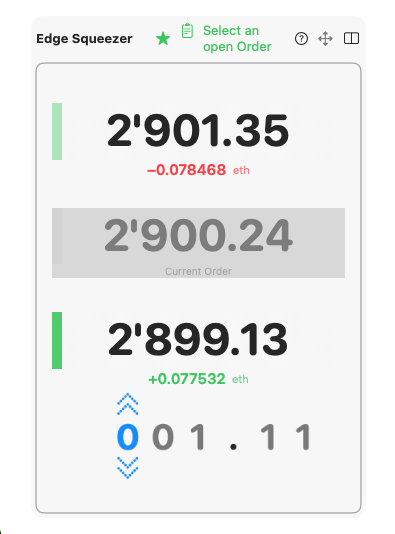
Hide the setup panel and focus on execution.
- Displays only the Squeezer and Squeezer Modifier
- Ideal for side-by-side use with trading tools (charts, order book)
Select Order to Squeeze #
Choose which open order should be adjusted.
- Select from active orders for the current market and account
- Apply squeeze individually per order
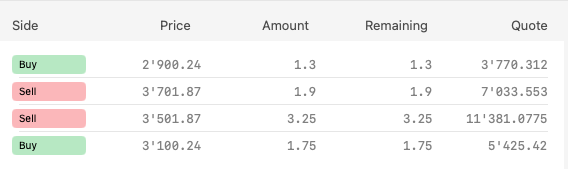
Reposition Entire Ladder #
Quickly adapt to market movement.
- Shift multiple open orders step by step
- Maintain structure while moving price levels
Reposition your entire ladder in seconds as the market moves.
Example:
- Select order → squeeze
- Select order → squeeze
- Select order → squeeze
Enables fast adjustment across multiple price levels.


